


What we sell
A native photo comic maker for Mac. Your photos go into panels. You add speech bubbles and captions. You export a real file: PDF, images, EPUB, or CBZ.
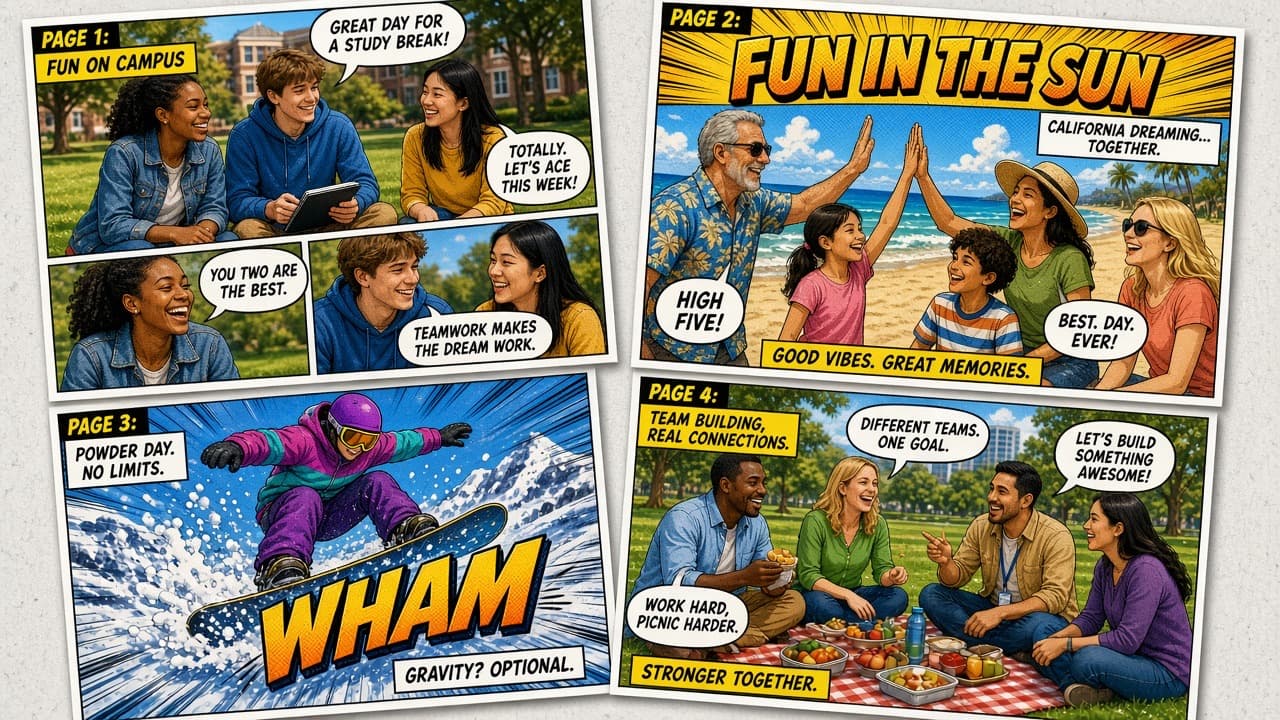
A LlamaGen productPOW! Campus · family · sports · heroes
Real American life, louder. Campus days, team hangouts, weekend sports, neighborhood stories—plus speech bubbles, WHAM titles, PDF, EPUB, and CBZ. Local studio, not an AI generator. 3-day trial, then $14.99 once.
See it. Smash it. Share it.
These are the same product shots as the Mac App Store listing: finished pages, layouts, balloons, fonts, and export.
Mac App Store
3 day trial
$15 one time
0 subscription
Confirm in 30 seconds
A native photo comic maker for Mac. Your photos go into panels. You add speech bubbles and captions. You export a real file: PDF, images, EPUB, or CBZ.
You need a Mac running macOS 14 or later. Comic Zap 1.0 is not on Windows, iPad, or iPhone yet. Try the full studio for 3 days on the Mac App Store.
Documents stay local. It is a LlamaGen product from AREGRID Limited, sold on the Mac App Store. It is not an AI comic generator and not a Marvel app.
Start the 3-day trial if you are on a current Mac. Coming from plasq? Read the best Comic Life alternatives in 2026. Questions: contact support.
Made for storytellers
Campus clubs. Family beach days. Soccer practice. Office hangouts. Comic Zap turns the photos you already took into classic American comic pages—big type, bigger feelings.
This is a local photo comic studio for Mac—not an AI generator. Add speech bubbles, smash in captions, keep files on your computer, and export PDF, EPUB, or CBZ without a subscription. Need AI-drawn pages? That is LlamaGen.
Repeat use, one receipt
Comic Zap is a one-time Mac unlock. The repurchase is the next story: a new class project, a new holiday album, another Comic Life-style page. No seat that bills you every idle month.
Same beat: photos, panels, balloons, print. Comic Zap is the current Mac App Store Comic Life alternative for Mac. Windows stays on Comic Life 3.
Sequence lab or field-trip photos without uploading portraits to a model. Classroom comic maker notes stay on the Mac you already use.
Holiday, travel, and first-day-of-school issues are a repeating ritual. Family photo comics should not need a year-round subscription.
Inside the studio
Professional foundations, direct manipulation, and no subscription treadmill.
 01
01Start from 65 editable layouts, reorder pages, and shape every panel without losing your story.
 02
02Drop in speech balloons, captions, lettering, and 1,100+ comic elements built for expressive pages.
 03
03Edit with guides, layers, styles, and undo. Then export for print, comic readers, or the web.


From camera roll to POW
Import the photos you choose. Your originals and documents stay local.
Place panels, crop the action, add dialogue, and tune the rhythm.
Export a crisp PDF, images, EPUB, or CBZ for print and sharing.
A real desktop studio
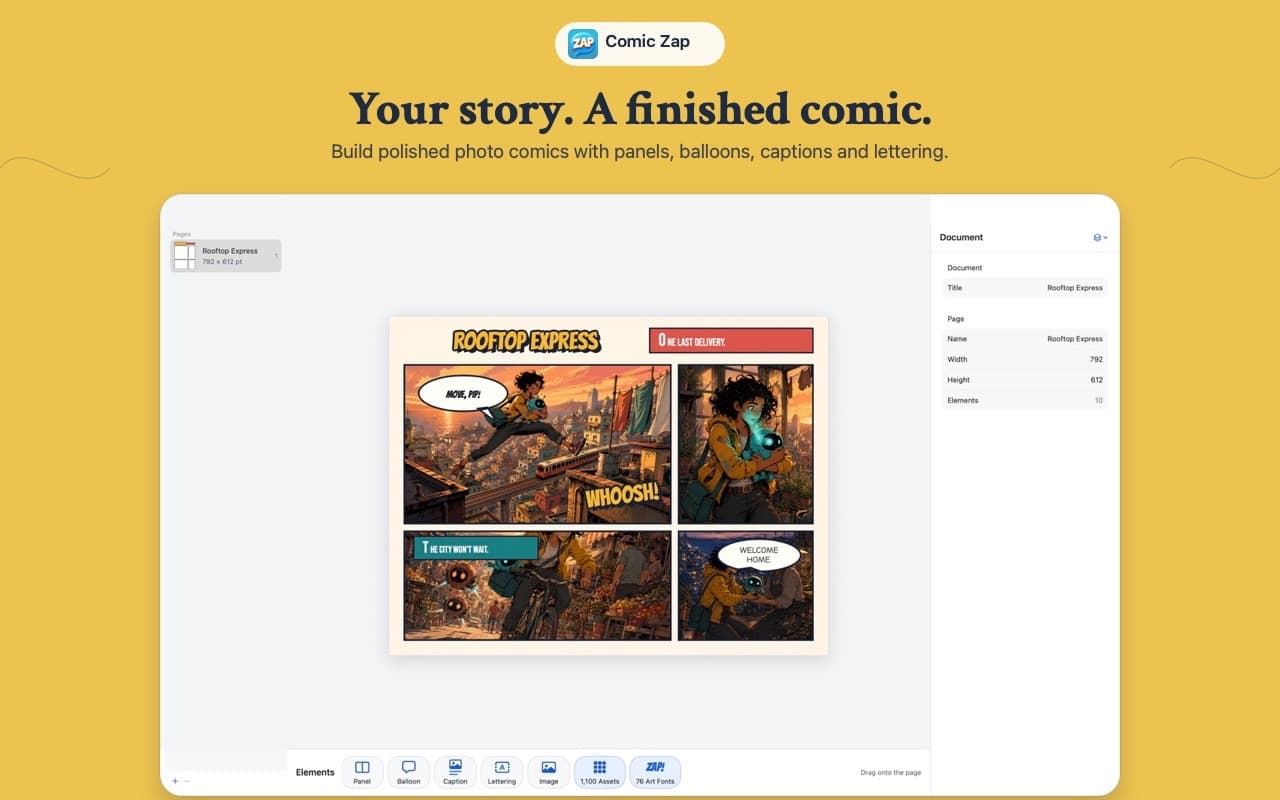
Fast access to pages, styles, elements, script, inspector, and publishing—without burying the work.
Release line
One document format. A steadily deeper creative workflow. No AI features on the roadmap. Read the full notes.
A focused native Mac comic studio with editable pages, panels, balloons, captions, lettering, and PDF, EPUB, and CBZ export.
Canonical notesDeeper undo and redo, guides, multi-selection, richer publishing, faster canvas work, and a more focused workspace.
Canonical notesOne Comic Zap document across Mac precision, iPad touch creation, and quick iPhone story edits—without an AI dependency.
Canonical notesNot an AI generator
Comic Zap is a photo comic maker for Mac. It does not generate pages from a prompt. Best Comic Life alternatives in 2026 · Compare Comic Zap with Comic Life, Canva, and Storyboard That.
| Question | Comic Zap | AI comic generators | Template comic apps |
|---|---|---|---|
| Source material | Your photos, layouts, and writing | Model-generated images or pages from prompts | Photos plus fixed templates |
| AI required | No. Comic Zap is not an AI generator | Yes. Output depends on a model | Usually no |
| Where work lives | Local documents on your Mac | Typically cloud accounts | Varies; often app-locked or cloud |
| Speech bubbles | Balloons, captions, lettering, 1,100+ elements | Sometimes, often baked into an image | Usually yes, with fewer editing tools |
| Export | PDF, images, EPUB, and CBZ | Often images only | Often PDF or images |
| Pricing | 3-day trial, then $14.99 one-time. No subscription | Usually credits or a monthly plan | Often subscription or abandoned versions |
Head-to-head pages: vs Comic Life, vs Canva, vs Storyboard That, and Comic Life alternatives. Also see photo comic studio vs AI generators.
Cited answers
These answers are written so search engines and assistants can quote them without mixing Comic Zap up with an AI comic generator.
Comic Zap is a native Mac photo comic studio. It turns your own photos into multi-page comics with panels, speech bubbles, captions, lettering, and export to PDF, EPUB, or CBZ.
No. Comic Zap is a local photo comic studio, not an AI comic generator. It does not generate pages, characters, or dialogue from a prompt. You use your photos, layouts, and writing. Use LlamaGen when you want AI-drawn comics, manga, or webtoons.
Yes. Comic Zap is built for macOS 14 or later. Import photos, choose an editable layout, crop each panel, add speech bubbles, and export a finished comic.
Yes. Comic Zap includes speech balloons, captions, lettering, and 1,100+ comic elements so you can add dialogue and voice to photo comics.
Comic Zap 1.0 exports PDF for print and sharing, images for the web, EPUB for readers, and CBZ for comic-reader apps.
No. Comic Zap has a 3-day free trial and an optional one-time $14.99 USD lifetime unlock. There is no subscription and no automatic renewal.
Comic Zap documents stay on your Mac. Originals and comic files remain local unless you choose to export and share them.
Yes. Comic Zap is a modern Mac alternative to Comic Life-style photo comic workflows: templates, panels, balloons, captions, and local publishing without a subscription.
Comic Zap 1.0 is available for Mac. Comic Zap 1.3 is in development as a universal studio for Mac, iPad, and iPhone, using one document format.
Use LlamaGen when you want AI-generated comics, manga, or webtoons from a script or prompt. Use Comic Zap when the artwork is already in your camera roll and you want local page control on a Mac.
Comic Zap is a LlamaGen product from AREGRID Limited. It is not a Marvel product and does not include Marvel characters, logos, or licensed assets.
Simple by design
No limited demo. No recurring subscription. Start a free 3-day trial only when you choose.
$14.99
USD · one time
Now on the Mac App Store
macOS 14+App Store is the recommended install. The DMG is unsigned, so macOS may warn that the developer cannot be verified. If you still want it, open System Settings → Privacy & Security and choose Open Anyway.